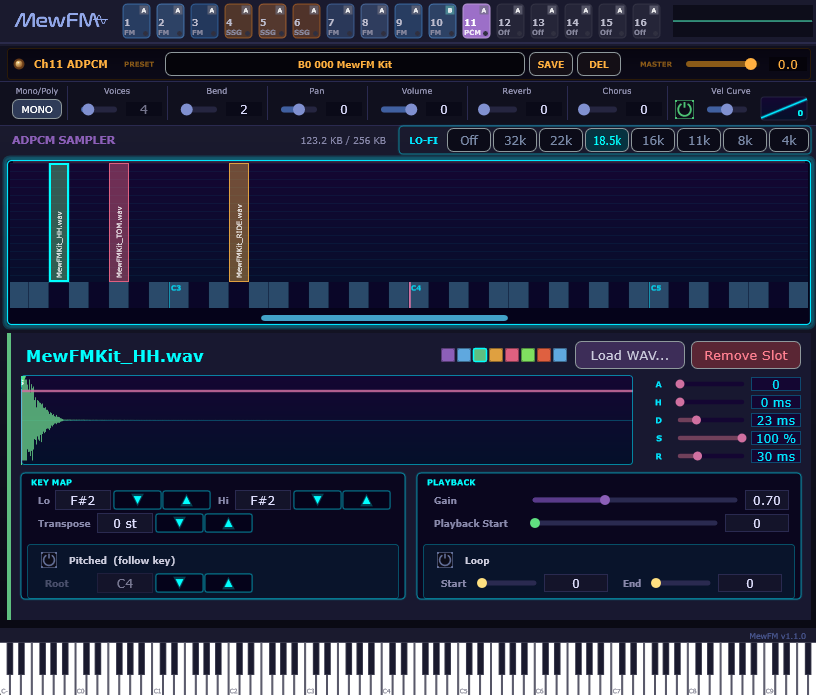
ADPCM is a 4-bit ADPCM sampler, modeled on the YM2608’s ADPCM-B.
When you load a WAV, MewFM encodes it as 4-bit ADPCM-B and stores it internally, then plays it back with variable pitch. Each ADPCM channel can hold a variable number of slots, so you can build a drum kit (different sample per zone) or a multisample pitched instrument (different roots per zone) in a single channel.
Channel-level settings
| Item | Description |
|---|---|
| LO-FI bar | Playback sample rate that applies to the whole channel. Eight steps: Off / 32k / 22k / **18.5k** / 16k / 11k / 8k / 4k. The selected step glows neon cyan. 18.5 kHz approximates the texture of the YM2608 ADPCM-A rhythm ROM. The internal scheme is sample-and-hold, so pitch is preserved while only the high end is progressively rolled off. |
| Memory | Shows the total ADPCM data loaded into this channel. The PC-98’s ADPCM RAM was 256 KB, given here for reference (MewFM itself has no hard limit). |
| Key map | A horizontally scrolling piano-keyboard view (1 note = 20 px, 165 px tall). The lower half is the piano strip; the upper half is the slot-bar area. Each slot has a bar whose width = key range, with a vertical label on the left; the selected slot is surrounded by a neon-cyan halo. |
| Shared channel parameters | Below the preset bar, you find MONO/POLY, Voices, Bend, Pan, Volume, Reverb, Chorus, and VelCurve (identical to FM / SSG). ADPCM channels also respond to CC 7 (Volume), CC 10 (Pan), Pitch Wheel, and MIDI Program Change + Bank Select. |
Adding, removing, and editing slots
| Action | Effect |
|---|---|
| Drag and drop onto the key map | Drop a WAV / AIFF / FLAC onto the key map. If no slot exists at that key, a single-note (drum-mode) slot is created; if a slot already exists, only its waveform is replaced (Key Range / Loop / AHDSR are preserved). A cyan vertical column appears at the drop position so you can visually confirm the landing key. |
| Right-click on the key map | Opens an Add / Remove context menu at the cursor position. If a slot is already there, a “Remove ○○” entry is shown. |
| Drag a bar | Center-drag moves the whole slot horizontally while preserving its range; dragging either end resizes only the Lo or Hi edge. When bars overlap, the selected slot takes priority. |
| Click / drag on the piano strip | Auditions that key. If a slot covers that key, the detail panel automatically switches to that slot. |
Slot detail panel
When you select a slot on the key map, the detail panel below switches to it. The header shows the slot name (large neon cyan), an 8-color palette swatch (pick any color for the key map), and Load WAV... / Remove Slot buttons.
KEY MAP
| Item | Description |
|---|---|
| Lo / Hi | The MIDI note range (inclusive) in which the slot sounds. For drums, Lo = Hi (single note); for melodic samples, set a range. |
| Transpose | Semitones to add to playback pitch (-48 to +48). Applied even in drum mode (Pitched OFF), so it works for tuning one-shots (lowering a kick by an octave, etc.). |
| Pitched (follow key) | Power button. ON enables pitched mode (pitch follows MIDI note); OFF enables drum mode (fixed pitch). Toggling enables or disables the Root field below. |
| Root (when Pitched) | The MIDI key at which the sample plays at its native rate (default C4 = 60). An “N” marker appears on the key map showing the native-rate position (shifted from Root by Transpose). |
PLAYBACK
| Item | Description |
|---|---|
| Gain | Per-slot output multiplier (0.0–2.0). |
| Playback Start | Where in the sample NoteOn starts playback. Also adjustable with the ▼ handle on the waveform preview. |
| Loop | Power button to toggle ON/OFF. Wraps from Loop End back to Loop Start. Loop End = 0 means the end of the buffer (the loaded sample loops over its full length). |
| Loop Start / End | Start and end sample positions of the loop. Also editable on the waveform preview via the hot-pink frame (center-drag moves, end-drag resizes). |
ENVELOPE
| Item | Description |
|---|---|
| A / H / D / S / R | The amp envelope (Attack / Hold / Decay / Sustain / Release). 0–5000 ms (Sustain is 0–100 %). Laid out as a slim slider column to the right of the waveform preview. The defaults (A = 0, H = 0, D = 0, S = 100 %, R = 30 ms) play the sample as-is with a short note-off fade. |
| Envelope overlay | The waveform preview shows the A → H → D → Sustain envelope shape overlaid in hot pink. It is anchored at Playback Start; if Transpose changes the playback rate, the time axis of the curve stretches accordingly. |
Presets
Like FM and SSG, the ADPCM channel uses the 16 banks × 128 slots preset system. Save / Load / Delete is on the preset bar at the top of the channel. MIDI Program Change and Bank Select (CC 0/32) are supported, with the CC 102 fallback for Cubase, so you can switch your own drum kits via Program Change at runtime.
Preset files are stored as XML (with the waveform data inline) at:
~/Documents/MewFM Presets/ADPCM/Slots/Bank<N>/<NNN>.xml
The filesystem is the source of truth for bank / slot — you can reorganize folders in Explorer, or move 000.xml to a different Bank, and the changes show up in the preset list on the next start.
The included MewFM Kit (Bank 0 / Slot 0, since v1.1) is a sample preset of an ADPCM-A–style 18.5 kHz drum kit.
ADPCM-B vs ADPCM-A
The YM2608 had two ADPCM sections: ADPCM-B, which can vary the playback step for pitched playback, and ADPCM-A, fixed at 18.5 kHz for the rhythm ROM.
MewFM’s base behavior is closer to ADPCM-B, and you can approximate the gritty ADPCM-A texture by selecting 18.5 kHz in LoFi mode.
The original rhythm ROM itself cannot be redistributed for copyright reasons, so drum kits are built from your own samples.