Overall layout
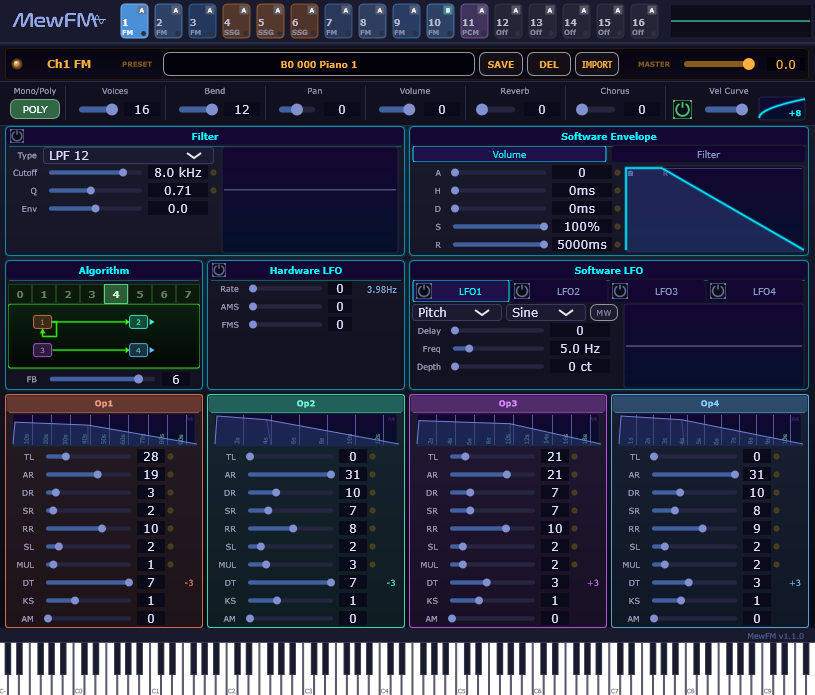
From top to bottom, the screen is made up of the following blocks:
- Channel strip (top row) — 16 channel buttons. Left-click to select, right-click to change Engine / Output.
- Preset bar (second row) — selected channel name, PRESET indicator, SAVE / DEL / IMPORT buttons, and the MASTER volume slider.
- Channel settings row (third row) — Mono/Poly, Voices, Bend Range, Pan, Volume, Reverb Send, Chorus Send, Vel Curve.
- Tone editor (the large central block)
- Filter (per-voice) / Software Envelope (Volume / Filter tab switch)
- Algorithm (0–7 plus the algorithm diagram and FB) / Hardware LFO / Software LFO (LFO 1–4 plus the ModWheel drive)
- Op1 – Op4 in four columns (TL / AR / DR / SR / RR / SL / MUL / DT / KS / AM)
- Piano keyboard (bottom row) — click with the mouse to preview.
Channel buttons
The 16 buttons across the top of the screen represent each channel.
- Left-click: select (the tone editor below switches to that channel).
- Right-click: a menu for switching Engine (FM / SSG / Off) and Output (A / B / C / D).
| Element | Meaning |
|---|---|
| Large number in the lower-left | Channel number (1–16). Matches the MIDI channel. |
| Small text in the lower-left | Engine type (FM / SSG / Off). |
| Colored badge in the upper-right | Output bus (A / B / C / D). |
| Background brightness | Bright = selected, dim = not selected. |
Tone editor
Edits the tone of the selected channel. FM and SSG show completely different parameters (see FM Synthesis / SSG).
The shared items (Volume, Pan, Bend Range, Poly, VelCurve, FX Send, the Preset row) appear in the same place in both.
Master controls
| Item | Location | Description |
|---|---|---|
| Master Volume | Right end of the preset bar (MASTER) | Applied uniformly to all four buses (-60 dB to +6 dB). |
| Reverb / Chorus Send | Channel settings row (third row) | Send amount to the shared FX buses (per-channel). |
| Oscilloscope | Upper-right of the channel strip | Shows the summed waveform of all four buses. |